
- support@ifer.cz
- +420 605 264 637
Map
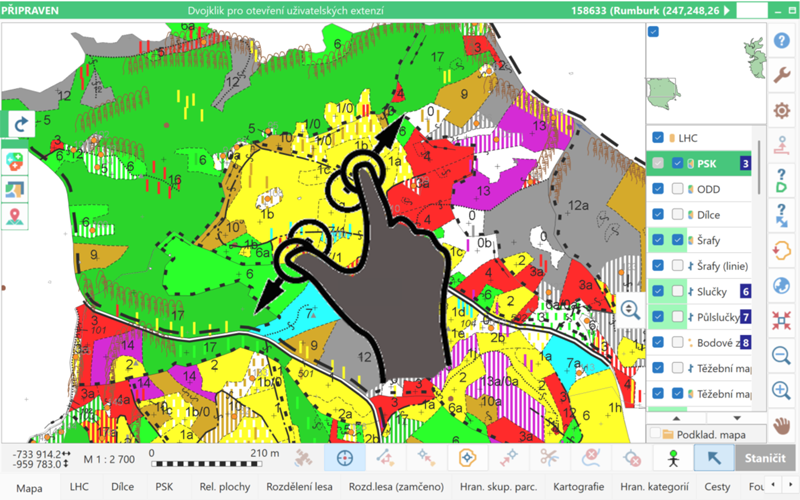
Zooming the Map Using Gestures
On touch-enabled devices, the map can now be zoomed in and out using two-finger gestures.
Number of Selected Features in the Map
The number of currently selected features in the map (points, lines, trees, centroids, etc.) is now displayed in the upper-left corner of the map.
Creating Lines from an Existing Point
When mapping a new line, it is now possible to start the line from a currently selected point on another line and specify only its end point. First, the starting point is selected, and then the end point is measured or clicked using the New Point button. Field-Map then draws a line between these two points.
Working with GIS Layers Using Tools
Batch Reversal of Line Direction
Reversing the start and end of a line can now be performed for multiple selected lines at once, or for lines filtered in the data. This function is particularly useful in projects where line symbols indicate direction (e.g. watercourse direction arrows).
Transferring Attributes Between Line Layers
Attribute values can now also be transferred between line layers. If the lines do not lie exactly on top of each other, a buffer around the reference line can be used during the search.
Searching for Lines Between Layers
It is now possible to find and select lines in one layer using lines from another layer, again with the option to define a buffer if the lines do not overlap exactly.
Lookup Lists and Keyboard
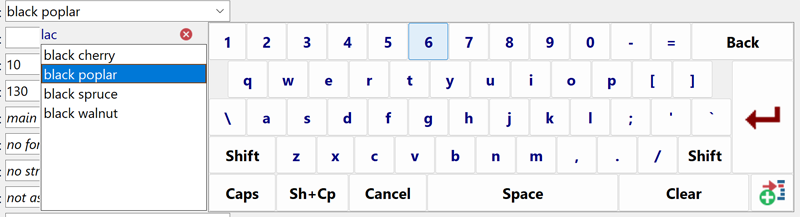
Searching Lookup Lists Using the Virtual Keyboard
When selecting an item from a long lookup list using the Field-Map virtual keyboard, the list can now be dynamically filtered by typing on the keyboard. As the user types, the list of items is progressively reduced. Searching works based on the occurrence of characters anywhere in the lookup list item text. The entered search text can be edited at any time. Once the desired item is found, it can be selected by double-clicking it or by selecting it and pressing Enter.
Optimization of the User Keyboard for Lookup Lists
The user keyboard for lookup lists has been further optimized. The font size and weight have been adjusted for better readability, and automatic wrapping of long text has been added. The option for manual text wrapping configured in Project Manager remains supported.
Virtual Keyboard for Memo Attributes
The virtual keyboard for Memo-type attributes has been optimized. It is now possible to delete text at any position (previously deletion was only possible from the end), and when all text is deleted using the DEL button, Field-Map now asks for confirmation before clearing the content.
Forms and Data Handling
Automatic Width Adjustment of Numeric Fields
To improve the display of numeric attributes on forms, it is now possible to enable automatic adjustment of numeric field width for individual layers based on the defined attribute size. For example, if a numeric attribute has a size of 4 with one decimal place, the field is displayed only as wide as necessary to correctly show the maximum value (e.g. 99.9). This option is particularly useful for layers with a larger number of numeric attributes.
Extension of the Fill Attribute Values Function
The Fill Attribute Values function, which allows bulk filling of records (selected, missing, or all) with a single value, has been extended to support subordinate layers as well. For example, if the Trees layer has a subordinate Damage layer with the attribute Damage Type, missing values can now be filled for all trees at once using this function.
Synchronization
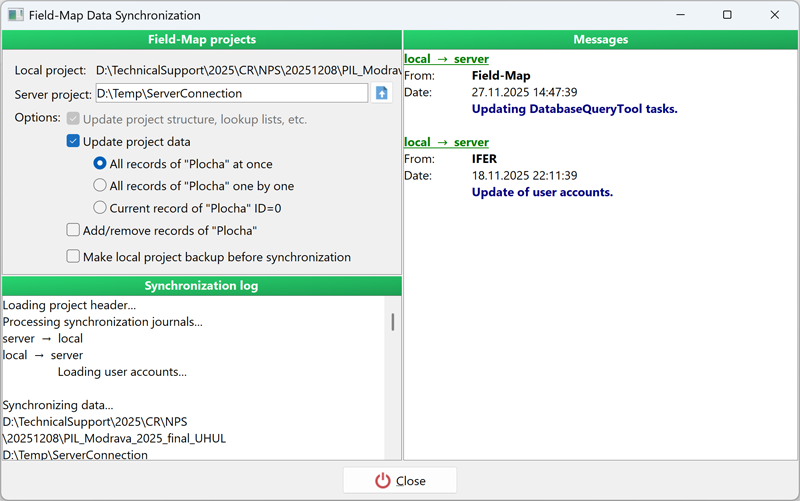
More Flexible Synchronization Workflow
It is now possible to synchronize only data, only metadata, or only plot assignments independently, or to perform all of these steps together in a single operation. For data synchronization, an additional option has been added to synchronize plots sequentially, one by one. This approach is particularly useful for projects with a large number of plots, as only a single plot is temporarily locked on the server at any given time. The option to synchronize all plots at once remains available.
Selecting Lookup Lists for Synchronization
Project managers can now select specific lookup lists to be updated during synchronization. In previous versions, only synchronization of all lookup lists at once was possible.
Automatic Connection to the Server Project
If the server project (server connection) is stored in the SERVER directory directly within the project structure, Field-Map automatically detects this directory and connects the server project for synchronization. This is especially useful when transferring a project between computers, as it eliminates the need to manually reconfigure the server project path.
Preservation of User Lookup List Settings
When an updated lookup list is synchronized from the server, the user’s settings for active and inactive items are preserved. Items that were inactive for the user before synchronization remain inactive even if they are active in the synchronized lookup list. Newly added items adopt the active/inactive state defined when they were sent to the server.
Custom PostgreSQL Port
When creating a new server project (connection) to a PostgreSQL database, it is now possible to specify a custom port. Previously, only the default port 5432 was supported.
Sorting Plots by ID
When selecting plots to be uploaded to the server or removed from specific users, the plot list is now sorted by plot ID. This makes plot selection clearer and easier.
Synchronization of Inactive Layers
Inactive layers (disabled in Project Manager) can now also be included in synchronization. This is useful, for example, during repeated measurements on inventory plots where the original tree layer is hidden, but older data still needs to be corrected or updated and synchronized.
Database Query Tool (DQT)
New Aggregate Function COUNT
The COUNT function has been added to the basic statistical functions alongside SUM and AVG. It allows tasks to be created that return the number of records. Like SUM and AVG, the COUNT function can be combined with GROUP BY, ORDER BY, and additional conditions.
Comparing Attributes in Conditions
It is now possible to specify the layer name and attribute name in DQT conditions, allowing two attributes to be compared with each other. For example, it is possible to find all records where the DBH value from the previous measurement stored in the oldDBH_mm attribute is greater than the current DBH value stored in DBH_mm, both in the Trees layer: “Trees”.“DBH_mm” < “Trees”.“oldDBH_mm”.
Sorting Plots in DQT Tasks
By default, plots in DQT tasks that include multiple plots are sorted by plot ID. Custom sorting can now be defined; if no custom order is specified, the default sorting by plot ID is applied.
Settings
Color Differentiation of GIS Layers
If you want to visually distinguish individual GIS layers in the map (in the layer panel on the right), this can now be configured in the settings. A different color can be assigned to each layer. The dark green color remains reserved for highlighting the currently selected layer and should not be used for other layers to avoid confusion.
Limiting GNSS Correction Quality
When using GNSS with RTK corrections, it is now possible to restrict GNSS data reception to selected correction types only – differential, float RTK, or fix RTK only. This gives users greater control over the quality and accuracy of measured data.
Camera and Measuring Devices
Field-Map Camera
Field-Map Camera (formerly Field-Map Simple Camera) has been extended to support the full resolution of the internal camera (previously only VGA resolution was supported). An option to rotate photos after capture has been added. Taking photos using Field-Map Camera is now significantly faster than using the Windows 10 Camera application.
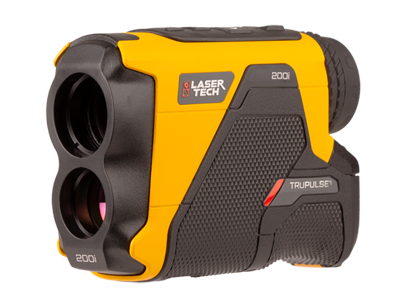
Support for New Devices
The new version adds support for TruPulse 200i and 360i laser rangefinders, both at the communication protocol level and via Bluetooth LE (if supported by the tablet). Support for the Vertex LaserGeo2 laser rangefinder has also been added, including support for remote diameter measurement. In addition, the TruAngle II angle encoder is now supported. TruAngle II connects to Field-Map separately via Bluetooth LE, as does the TruPulse device. Operation is controlled via the TruPulse: after measuring distance and inclination, TruPulse sends the data to Field-Map, which then requests relative angle data from TruAngle II. Once all required data are available, Field-Map displays the resulting point in the map.
Polygonization
Improved Polygonization in PolyShape
Polygonization in the PolyShape tool has been improved, particularly in terms of performance when processing large datasets. Incremental polygonization has also been significantly optimized.
Project Manager
Importing Data from Multiple Projects
When plots from multiple projects are imported into a single project, a new function Import Data From Multiple Projects is available. This function allows plots to be imported into the currently open project from a single directory containing multiple projects. All projects must have the same structure, including lookup lists.
Printing the Project Structure
System attributes can now also be included when printing the project structure.
Firebird Desktop
Enhanced SQL editor and query execution features.
Firebird Desktop now displays the current line and column number in the SQL editor, allowing precise cursor position tracking and better orientation in complex scripts. Users can execute only a selected part of a SQL script using Ctrl+F9, even when the surrounding text is incomplete or invalid. Query execution has been improved to fully support CTE queries starting with WITH as well as DML statements using the RETURNING clause, allowing their results to be displayed directly in the grid.
Scripting
New scripting functions
In the new version of Field-Map, dozens of new scripting functions, procedures, and events have been added. Scripting can now also be used to control many Field-Map settings for different user levels, including enabling or disabling options, buttons, and application functions.
Localization
New Language Versions
The Data Collector interface has been newly translated into Italian and Slovak. Field-Map is now available in 14 different languages.